This chapter is about the how: the everyday code you write with arrays. Every snippet comes in JavaScript, Python, Java and C++ — pick your language on any code box and the site remembers it for every lesson.
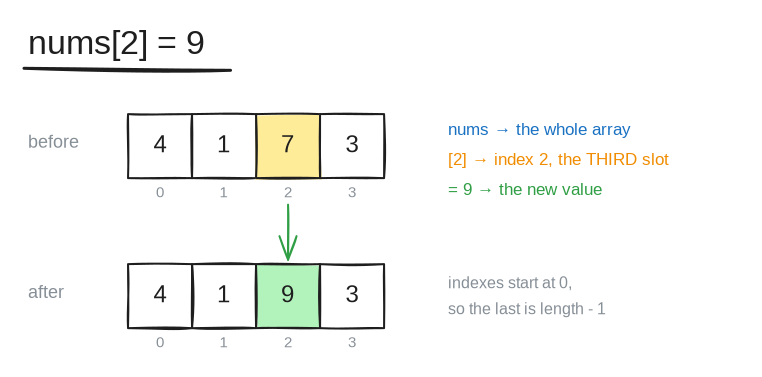
Read nums[2] aloud as "nums at index 2". Indexes count from 0, which feels odd at first: the index is really a distance from the start, and the first element is zero steps away. The last element of an array of length n is therefore at index n - 1.
There are two common ways: list the values directly, or ask for a number of slots filled with a default value.
const primes = [2, 3, 5, 7, 11]; // list the valuesconst scores = new Array(5).fill(0); // 5 slots, all 0const empty = []; // grows as you addconsole.log(primes.length); // 5In Java and C++, a plain array has a fixed size chosen when it's created. When you need an array that grows, use ArrayList (Java) or vector (C++). JavaScript arrays and Python lists grow on their own.
const nums = [4, 1, 7, 3];console.log(nums[0]); // 4 (first)console.log(nums[nums.length - 1]); // 3 (last)nums[2] = 9; // update in placeconsole.log(nums); // [4, 1, 9, 3]Reading or writing any index costs the same: O(1). The computer never walks to index 2 — it calculates where index 2 lives, as you saw in the memory model lesson.
Growable arrays can add and remove at the end cheaply, because nothing else has to move:
const stack = [1, 2];stack.push(3); // [1, 2, 3]const last = stack.pop(); // last = 3, stack = [1, 2]Adding or removing at the front or in the middle is a different story: every later element has to shift one place, so it costs O(n). JavaScript's unshift/shift, Python's insert(0, x)/pop(0), and add(0, x) on an ArrayList all look innocent but hide that loop.
nums[i]: O(1).Keep this list in mind. Nearly every optimisation in this course is about replacing an O(n) operation, repeated inside a loop, with an O(1) one.